7 Best Batch Printing Software Tools for Windows
Quick answer:
- Mixed office files and saved emails: Batch Print Software prints one queue with every file closed
- Mostly PDFs on a one-time licence: Print Conductor, Batch & Print Pro and Total PDF Printer list prices from $49.90 to $149
- A few files of one type: select them in File Explorer, right-click and choose Print
Most rankings of the best batch printing software include label designers and virtual PDF printers. This list covers Windows programs that send office files to a printer without opening each one, with priority given to queues that mix PDFs, Office files and saved emails. We make the program that ranks first here. The other cards identify what we checked on vendor pages and when.
In this guide
- Our program and six alternatives compared, with listed prices
- Seven reviews, each with a verdict
- The limits of right-click Print in File Explorer
- Choices for an office, a home PC or a print server
Batch printing tools compared at a glance
Prices are in US dollars, from official order or product pages checked on 12 November 2026. Confirm them with the vendor before paying.
| Tool | Best for | Mixed formats in one list | Listed price (12 Nov 2026) | Trial |
|---|---|---|---|---|
| Batch Print Software | Mixed office files and saved emails | Yes, 50+ file types plus ZIP archives | See the product page | Free trial, no registration |
| Print Conductor | Large document runs sorted by name | Yes, 90+ types claimed by the vendor | $149 one-time, single commercial licence | Evaluation trial |
| Batch & Print Pro | Saved print lists and hot folders | Yes, PDF and Office files, HTML, text and images | $79.95 per installation ($109.95 Premium) | Free trial |
| Total PDF Printer Pro | Mixed files and scripted runs | Yes in Pro; the $49.90 edition prints PDF only | $119 one-time | 30 days |
| VeryPDF PDF Batch Print GUI | PDF-only stacks on a small budget | PDF only | $49.95 (version 3.0) | 100 runs |
| FolderMill | Unattended printing on a server | Prints files dropped into hot folders | $499 one-time | See fCoder's page |
| Windows File Explorer | A few files of one type | No | Free, built into Windows | Not needed |
How we picked and tested these tools
We ranked mixed-format queues that print with every file closed first, followed by per-file settings, print order and run reports. Price broke ties.
- Mixed file types in one list
- Printing without opening files in their own apps
- Per-file settings, such as copies or two-sided printing
- A fixed print order and a record of printed and skipped files
- One-time or subscription pricing
In manufacturing, "batch printing" also means label runs and lot codes. In computing, batch processing means a group of jobs run without someone intervening between them. Here we cover office documents on a Windows PC.
We build the first-ranked program and test it on our own file sets. I tried Print Conductor 12 in August 2026. For the other four paid programs, I read official pages without buying licences; those assessments rely on vendor documentation. Review sites blocked our checks, and most programs had few public ratings. We found too little independent evidence to quote star scores.
Best batch printing software: seven tools, reviewed
1. Batch Print Software - best for mixed office files and saved emails
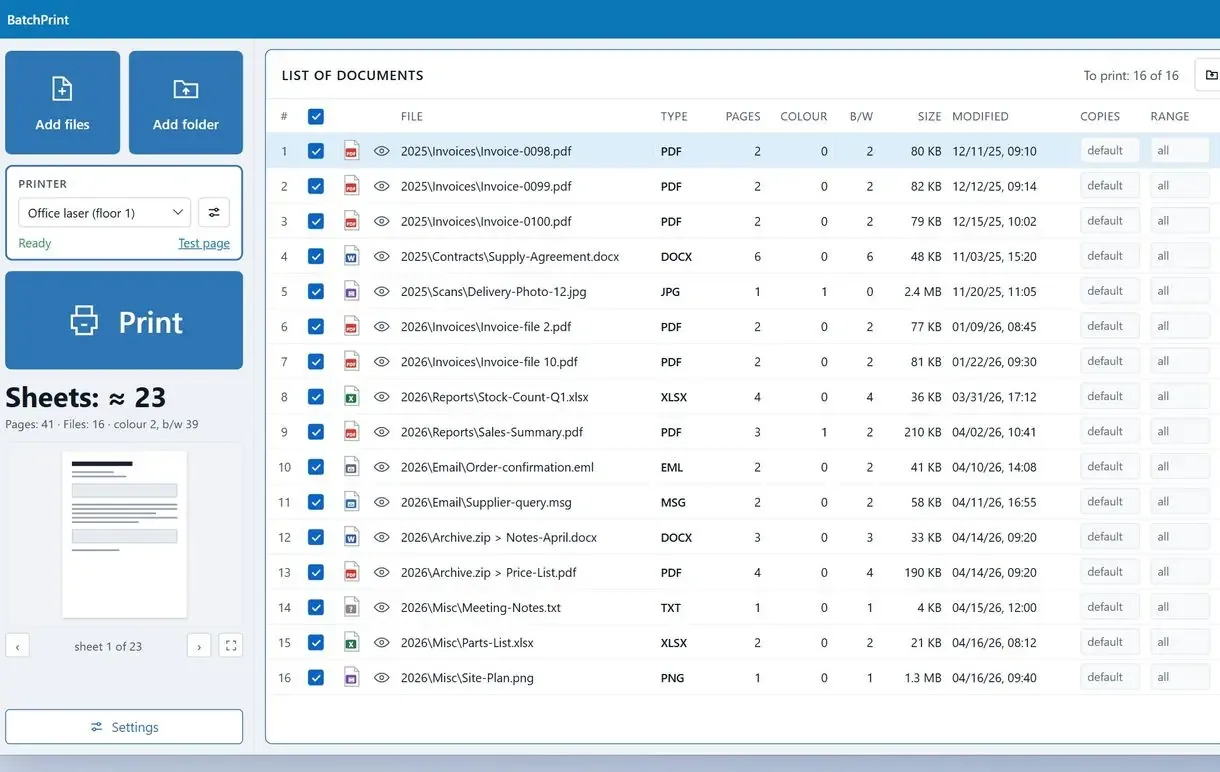
Add single files, whole folders or ZIP archives to Batch Print Software. The program can print files without opening them, so each file stays closed during the run. You can batch print mixed file types in one list:
- PDF and XPS documents
- Word DOCX and Excel XLSX files
- JPG or PNG photos and TIFF scans
- TXT and CSV text plus HTML pages
- Saved EML and MSG emails, with each attachment on its own row
The open-source PDFium engine renders PDF pages without a PDF reader installed. Each row has its own copies and page range, plus duplex and tray settings. The sheet count stays under the Print button, showing your paper total before printing. Save lists as .bpq files and settings as .bpset to reuse the setup, so this print queue software for Windows remembers your usual runs. The interface has 20 languages.
Pros:
- Mixes office formats and saved emails
- Prints DOCX, XLSX and saved emails without Office or Outlook installed
- Sets copies, page range and duplex per file
- Shows the sheet count before printing and a skip report after
Cons:
- Has few independent reviews because the program is new
- Takes a first run to learn the panel of per-file options
Our take: We use the end-of-run report most. It records damaged or password-protected files with a reason while the rest of the batch keeps printing.
Verdict: Choose it for mixed formats when you need a record of what printed.
2. Print Conductor - best for large document runs sorted by name
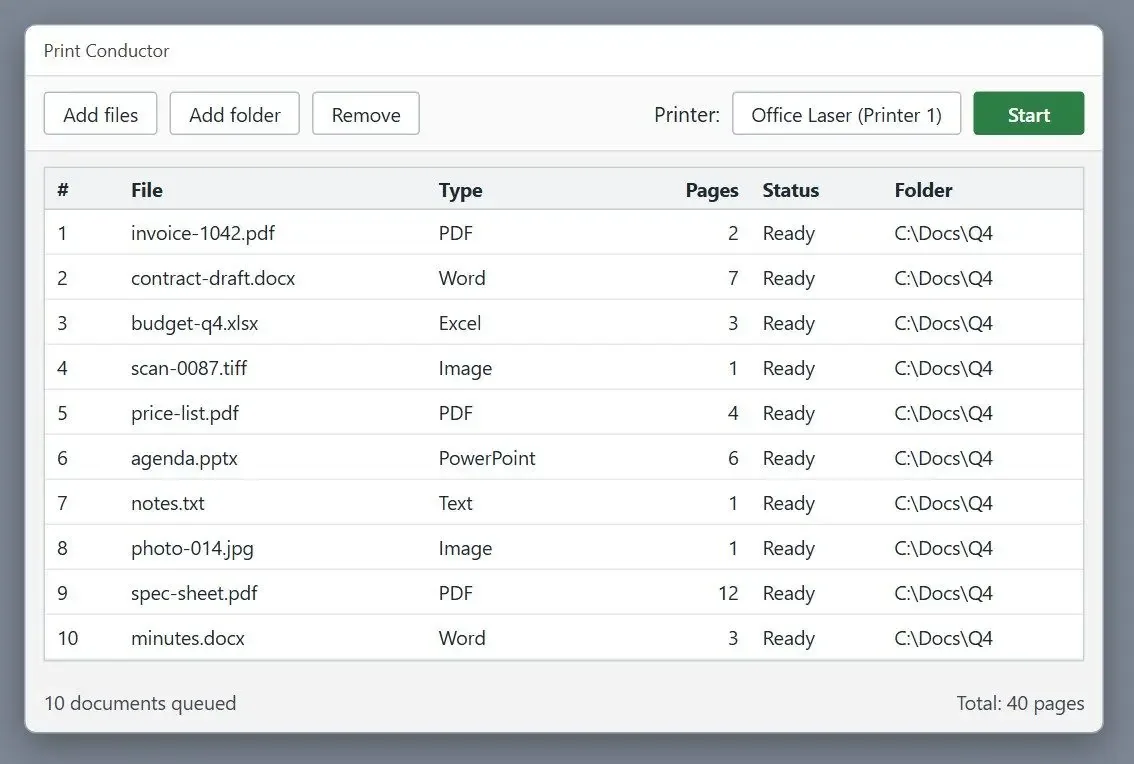
Print Conductor from fCoder appears in nearly every thread about printing PDF stacks. On Adobe's support forum, users recommend it for sorting files by name before printing; one office worker said it saved him almost an hour on a PDF batch. The vendor claims over 90 document types and entirely offline processing, with a one-time licence.
The order page listed a single commercial licence at $149. Per-user prices fall to $99, $79 and $59 at 5, 20 and 50 users. Organisation licences priced by user count start at $2,450.
Pros:
- Claims over 90 document types in one list
- Processes jobs offline, per the vendor
- Sorts files by name
- Offers volume discounts on one-time licences
Cons:
- Adds a report page after each trial session
- Buries options in a deep settings tree
- Has an installer of about 216 MB for version 12
My take: The version 12 trial had 206 options across 42 nodes. That depth suits a print room with fixed profiles.
Verdict: Pick it for large PDF runs where name order matters and the licence fits your budget.
3. Batch & Print Pro - best for saved print lists and hot folders
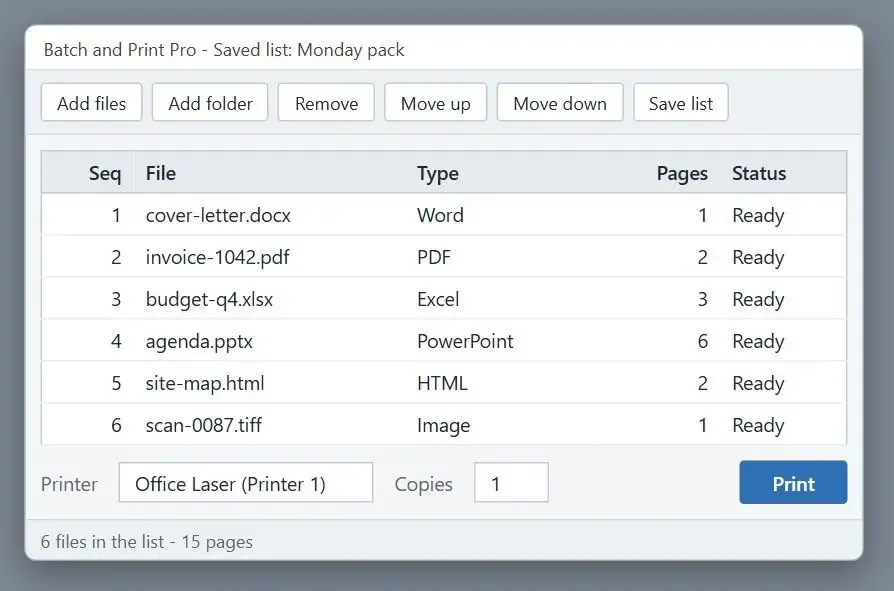
Batch & Print Pro comes from Traction Software in the UK. Its page lists PDF and Office formats up to PowerPoint, plus HTML and plain text. Images are on the list too. On 12 November 2026, the 2026 Standard edition cost $79.95 per installation. Premium was $109.95 and included the major upgrade to version 2028. The vendor charges the same for every kind of installation, including servers.
Pros:
- Saves lists in your chosen print sequence
- Watches hot folders for unattended jobs
- Charges the same for home, office and server installs
- Opens ZIP archives in the list
Cons:
- Has almost no independent reviews or public ratings
- Requires Premium for the version 2028 upgrade
- Keeps nearly all its detail on one vendor page
My take: Based on the documentation, it covers both a desk-side list and a hot folder at the Standard price.
Verdict: Choose it for repeated document sets and hot folders.
4. Total PDF Printer Pro - best for mixed files plus a command line
Coolutils' product pages listed two editions on 12 November 2026. Total PDF Printer handles PDFs at $49.90 with a lifetime licence. Total PDF Printer Pro, at $119, adds DOC and XLS files, plus TIFF and other images. Both run on Windows 7 through 11, sort by date or name, add separator sheets and stamp headers onto pages. You can start scripted jobs from the command line. The Pro trial lasts 30 days; the vendor says it has no feature limits.
Pros:
- Mixes DOC, XLS and images with PDFs in Pro
- Sorts by date or file name
- Adds separator sheets
- Accepts command-line calls
Cons:
- Requires the $119 Pro edition for mixed formats
- Limits the $49.90 edition to PDF
- Shows only self-reported star ratings on the vendor site
My take: I would buy Pro for an office stack containing Word files. The cheaper edition is enough for PDF-only folders.
Verdict: Pick Pro when a script starts your print runs.
5. VeryPDF PDF Batch Print GUI - best for PDF-only stacks on a small budget
VeryPDF PDF Batch Print GUI prints multiple PDFs in one process. The product page lists version 3.0 at $49.95, with 100 trial runs. The page looks dated, and a third-party directory lists version 3.1. Check the current build before buying.
Pros:
- Prints a PDF stack in one process
- Sets printer and tray in one window
- Allows 100 trial runs
Cons:
- Handles PDF files only
- Lists version 3.0 while a directory shows 3.1
- Has no independent reviews we could find
My take: The page describes the basic program I expected. It fits a folder of invoices, provided every file is a PDF.
Verdict: Choose it for PDF-only batches when $49.95 is your ceiling.
6. FolderMill - best for unattended printing on a server
FolderMill from fCoder watches hot folders on a server. Staff drop files into a shared folder; the program prints them on a set printer or converts them. The official page lists a one-time perpetual commercial licence for $499.
Pros:
- Prints files as they arrive in a watched folder
- Runs on a server without an operator per batch
- Converts incoming files
- Offers a one-time perpetual licence
Cons:
- Has the highest one-time price here at $499
- Requires server setup
- Adds overhead if you print one stack a month
My take: It earns its price in a front office where five people drop files into one share all day.
Verdict: Pick FolderMill for printing without anyone sitting at the PC.
7. Windows File Explorer - best for a handful of files of one type
Select files, right-click and choose Print; in Windows 11, open Show more options first. Windows opens each file in its default app and prints with that app's defaults. This works for six photos or four PDFs.
Pros:
- Costs nothing and needs no installation
- Prints a few files of one type in three clicks
- Uses the printer already set up in Windows
Cons:
- Hides Print when you select more than 15 files
- Uses default settings for every file
- Keeps no record of what printed
My take: For a weekly handful of same-type files, I would use it.
Verdict: Switch to a batch program when your selection mixes formats or exceeds 15 files.
Why does right-click Print in File Explorer stop working?
Windows hides commands such as Print when you select more than 15 files. Mixed selections can fail below that limit because each file must open in its own app.
Microsoft's support article says the context menu loses commands such as Open and Print when you select more than 15 files. The registry value MultipleInvokePromptMinimum sets that number. People on Microsoft's Q&A forum still encountered the limit on Windows 11 in 2025.
Older reports say Windows 7 printed several files together only if they shared one file type. Adding a PDF to a selection of Word files made Print disappear. Users described opening each PDF in a reader and printing it manually as the fallback.
Printing also depends on file associations. If the app assigned to an extension is missing or set up incorrectly, the file fails to print and Explorer does not identify it.
Right-click Print in File Explorer
- Up to 15 files, then Print disappears
- Each file opens in its own app
- Default settings on every page
- No list of what printed
A batch printing tool's queue
- Hundreds of files in one list
- Files stay closed during the run
- Copies, range and duplex per file
- A report of printed and skipped files
Can each file keep its own copies, page range and duplex?
File Explorer and dragging files onto a printer icon use defaults for every file. A batch program can print an invoice twice and double-sided while printing the cover letter once.
Dragging files onto a printer icon shows a prompt about printing multiple files, then sends them with default settings. Contracts may need two-sided printing, a price list only pages 1 to 3, and a contact sheet four photos per page.
Every paid program here has batch settings, but per-file control varies. In our app, each row can override the defaults. Besides copies and page range, you can set pages per sheet with their order and border. Scale, orientation and watermark are set per row too, as are paper size and colour mode. Print Conductor offers similar control in its settings tree. VeryPDF sets the printer and tray once for the PDF batch. Duplex and tray options depend on your printer driver and model.
Pages per sheet puts several pages on one sheet. To split a picture instead, follow the steps to print one image across several sheets.
For letters and reports in Word format, follow the walkthrough to batch print Word documents.
In what order do batch-printed files come out?
Programs with a list print in list order. File Explorer gives you no list or fixed sequence.
You may need invoices in number order or a client pack with its cover letter first. On Adobe's forum, an office printing hundreds of PDFs each month asked how to select files by type. Acrobat's folder option added every supported file from all subfolders, without a way to select by extension.
Our app prints from top to bottom, with collate and reverse order available. Print Conductor sorts by file name, Batch & Print Pro uses your saved sequence, and Total PDF Printer Pro sorts by date or name. Check the first three sheets before leaving a 300-page run unattended.
How do you see which files printed and which were skipped?
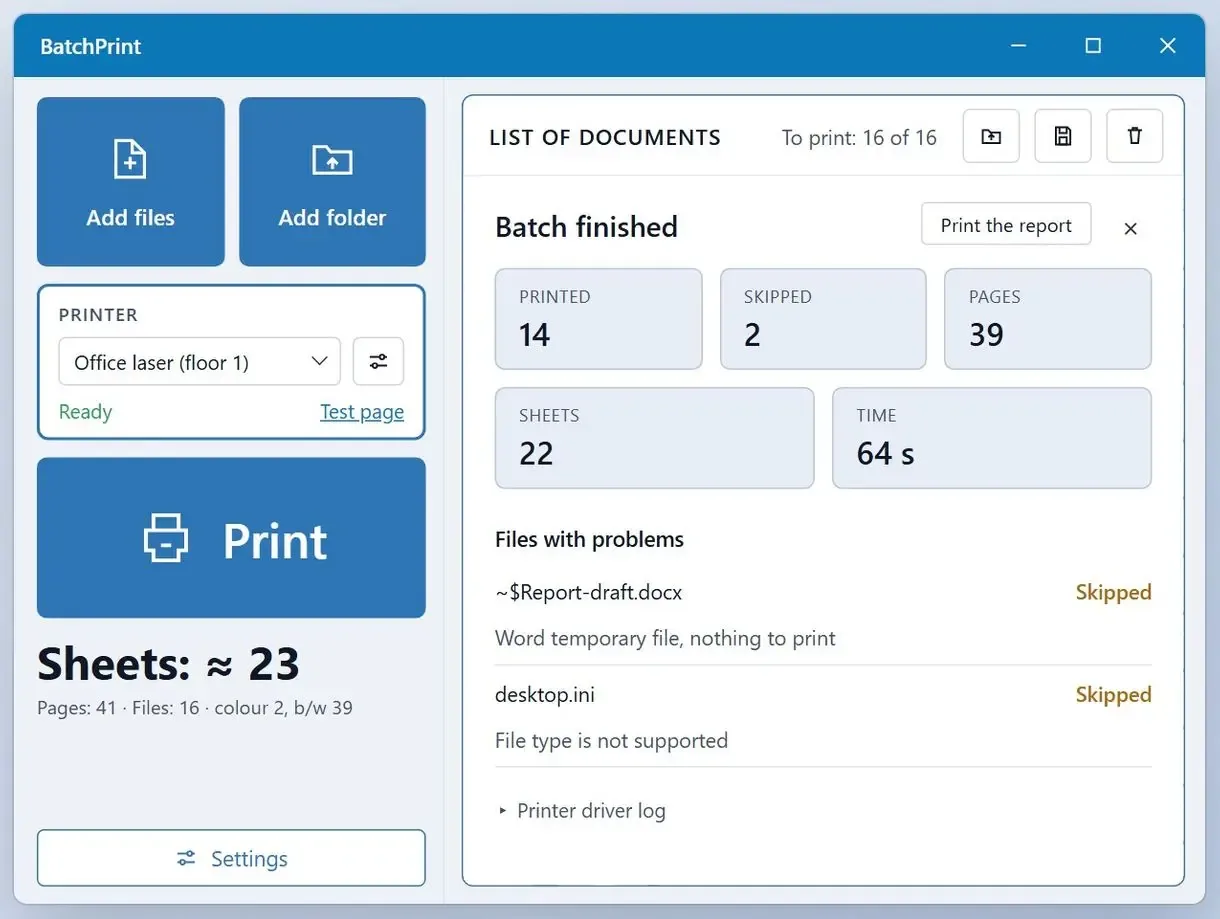
Check the end-of-run report for skipped files and their reasons. Without it, you may discover a missing contract only when someone asks.
Silent gaps are the main complaint in batch printing threads. One Windows 10 user reported that only the first two selected files printed. Another encountered a file-association error that stopped Acrobat from printing the batch. Neither had a list of files that failed to reach paper.
In our test of 22 mixed files, our program's report showed 18 printed and 4 skipped with reasons, totalling 236 pages. Print Conductor's page lists three types of print reports. The other vendors' pages did not describe a skip report.
Do you need a hot folder in batch print software for Windows, or is a manual batch enough?
Printing by hand from a list suits someone with a stack at a desk. A hot folder suits a server printing files from a shared folder without anyone pressing Print.
When you print by hand, build the list and check settings and the sheet count before you start printing. FolderMill and Batch & Print Pro can send new files from a watched folder to a set printer as they arrive. A script can start Total PDF Printer Pro.
A manual list is quicker to set up and easier to check page by page when you choose what to print that day. For files arriving all day from scanners or other systems, folder monitoring saves trips to the PC.
At least one roundup credits Print Conductor with scheduled runs and job history. Its official page lists no scheduler; fCoder sells folder automation separately as FolderMill. Check the vendor page before paying for a feature promised in a roundup.
How much does batch printing software cost?
Official pages checked on 12 November 2026 listed one-time desktop licences from $49.90 to $149 and a hot-folder server licence at $499. Our plans and Print Conductor's organisation licences also include subscriptions.
Two office PCs need two Batch & Print Pro licences at $79.95 each. Print Conductor charges per user. FolderMill's $499 licence covers one server printing for many people.
Our program offers perpetual, yearly and monthly licences, with current prices on the product page. A monthly plan suits a one-off audit pack; daily printing favours a perpetual licence.
Is there batch printing software free of charge?
File Explorer is the free option we could verify for short, single-type stacks. Commercial programs offer trials: 30 days for Total PDF Printer Pro and 100 runs for VeryPDF. You can batch print with a free trial of our app, and it needs no registration.
Searches for batch printing software free or bulk printing software free found small utilities whose current versions, formats and terms we could not verify on official pages. They appear in the exclusions below. A free PDF reader prints one open document at a time: 80 files mean 80 print dialogs.
Try a real stack, check the order and report, and decide whether to buy a licence.
Which batch printing tool fits your work?
Choose by who presses Print and which files you have. Mixed formats narrow your options for the best batch printing software; PDF-only folders leave more choice.
Office manager with a mixed month-end stack. Our app takes PDF invoices and Excel timesheets in one list, along with scanned receipts and approval emails. Print invoices two-sided and timesheets once.
Accounts team printing hundreds of PDFs from subfolders each month. Print Conductor sorts by name and offers volume licences per user. Our program also fits when Word or Excel files join the pile.
Small business with PDF-only folders and a tight budget. Choose VeryPDF PDF Batch Print GUI at $49.95 or Total PDF Printer at $49.90; both are batch print PDF software.
IT admin running a shared print server. FolderMill suits this job. Batch & Print Pro includes hot folders and server use at $79.95 per installation.
Home user with a handful of photos or PDFs. Use File Explorer. Try a batch program for larger or mixed selections.
Tools we also considered and left out
- BarTender and ZebraDesigner design variable-data labels and barcodes rather than print office document batches.
- Bullzip PDF Printer converts output from other apps to PDF; it has no queue of existing files for a paper printer.
- An older Adobe forum thread recommended SilentPrint for PDF batches. We found no current official page with a version or price.
- A software directory named BulkPrinter and AcroTeX PDF Print Monitor as free alternatives but blocked our checks.
- A free-software roundup listed Batch Print Handler, but its page returned unrelated content when opened.
Sources
- MSGReader on GitHub, the open-source library for reading Outlook MSG and EML message files
- ISO 32000-2 (PDF 2.0), the international standard defining PDF
FAQ
What is some free software for batch printing PDF files?
File Explorer is the free tool we could verify. Select up to 15 PDFs, right-click and choose Print, and each file opens in your default PDF app. For bigger stacks, VeryPDF PDF Batch Print GUI gives 100 trial runs and Total PDF Printer Pro a 30-day trial.
Is Print Conductor free?
It offers an evaluation trial; commercial use requires a paid licence.
How do I batch print PDF files in Windows 11?
Select up to 15 PDFs in File Explorer, right-click, open Show more options and choose Print. For larger batches or custom settings, add the folder to a batch program. Follow the step-by-step guide for a stack of PDFs on Windows 11 and Mac for both routes.
How to batch print multiple files?
Add files or folders, adjust copies or duplex on any row that needs different settings, and check the sheet count. Start printing and read the report for skipped files.
Can you print more than one file at once?
Yes. Use File Explorer for a small selection of one type, or a batch program for a mixed list printed in sequence.
How to batch print in File Explorer?
Select the files, right-click and choose Print; in Windows 11, Print sits under Show more options. Windows opens each file in its default app with default settings, and the command disappears once the selection passes 15 files.
Can I batch print EML and MSG emails without Outlook?
Our program prints saved .eml files in the internet message format and .msg files in the Outlook item file format without a mail client installed.
Got a whole stack waiting? Drop the folder into one queue and press Start.