The Best Print Conductor Alternative for Windows: 6 Batch Printers Compared
Quick answer:
- Mixed PDF, Word and email stacks: Batch Print Software prints them in one queue with a per-file report
- Zero budget: BulkPrinter has a free edition, while Print Conductor itself is paid, with a free trial that adds a report page
- PDF-only stacks: Total PDF Printer; scheduled jobs: 2Printer; one folder shared by a team: FolderMill
Lists of a print conductor alternative often run to 30 names, including programs that manage printers across a company. To print multiple files from a folder on a Windows PC, the shortlist is closer to six. You can fill a queue by hand, save files into a folder the program watches and prints, or have Windows Task Scheduler run a print command at a set time. Price separates these programs more than features do.
We make the first program on this list. We checked vendor pages and independent reviews for the other five on November 12, 2026, without buying their licenses. Their assessments rest on documentation.
In this guide
- Six batch printing programs reviewed with pros and cons (ours is first)
- Is Print Conductor free, or only a trial?
- Printing Word and Excel files without Office
- Choose a program for your print job
Seat prices and Office files: when to pick a Print Conductor alternative
Cost per seat starts most searches: about $149 for a commercial license. Word and Excel printing also needs Office programs installed on the same PC.
Print Conductor comes from fCoder. The latest version, 12, shipped in May 2026, the vendor says it handles over 90 document types, and files are processed offline.
If you print invoices once a week, $149 for one seat feels steep. Volume discounts start at five seats.
The full-featured trial adds a report sheet after every run. You have to remove it before handing the stack to a client.
Download catalogs, including SnapFiles, note that .DOC and other Office formats need Microsoft Office or OpenOffice installed. On a fresh laptop or a locked-down office PC, that requirement can decide your choice.
The Reddit thread that ranks first for this search asks for a free or open-source replacement. The AlternativeTo list for Print Conductor includes paid and free programs, with no open-source batch printer.
Quick comparison: price, trial and file types
| Tool | Best for | Listed price | Trial or free edition | File types |
|---|---|---|---|---|
| Batch Print Software | Folders mixing documents with emails and images | On the product page | Free trial, no registration | 50+ extensions |
| Total PDF Printer Pro | PDF-heavy work with some Word and Excel files | $119.00 | 30-day trial | PDF, DOC, XLS, TIFF, images |
| BulkPrinter | A free start with mixed documents | $49.95 for PRO (promotion) | Free edition | PDF, Word, Excel, PowerPoint, images |
| Total PDF Printer | PDF-only stacks on a budget | $49.90, lifetime license | 30-day trial, no registration | |
| 2Printer | Command-line and scheduled printing | See the vendor site | Free for non-commercial use | Document files from a command |
| FolderMill | Hot folders on a shared PC or server | $499, one-time | Free edition with a watermark | Office and image files by folder rules |
| Print Conductor (reference) | Batch printing from a window | About $149 per seat; $99, $79 or $59 per user at 5+, 20+ or 50+ seats | Full features plus a report page per session | Over 90 document types (vendor claim) |
Prices are the vendors' listed figures on November 12, 2026, except Print Conductor's single-seat price. That comes from two independent reviews because the vendor's order page did not show it. Check current promotions before you pay.
How we picked and judged these tools
Ongoing cost and trial terms led the ranking. Mixed file support and dependence on other installed programs came next.
Each program had to batch print on Windows, so you can print without opening files individually. We weighed:
- Listed price and one-time or yearly payment
- Trial or free-edition terms, including additions to printed pages
- Mixed file types in one run
- Required installations of Word, Excel or a PDF reader
- Manual or automatic delivery of files to the printer
G2 and Capterra review pages were closed to our checks, so we have not included star ratings. Print Conductor is the reference in the table, outside the ranking, so you can compare each alternative to Print Conductor directly.
Six batch printing tools reviewed
1. Batch Print Software - best for mixed stacks of office files, email and images
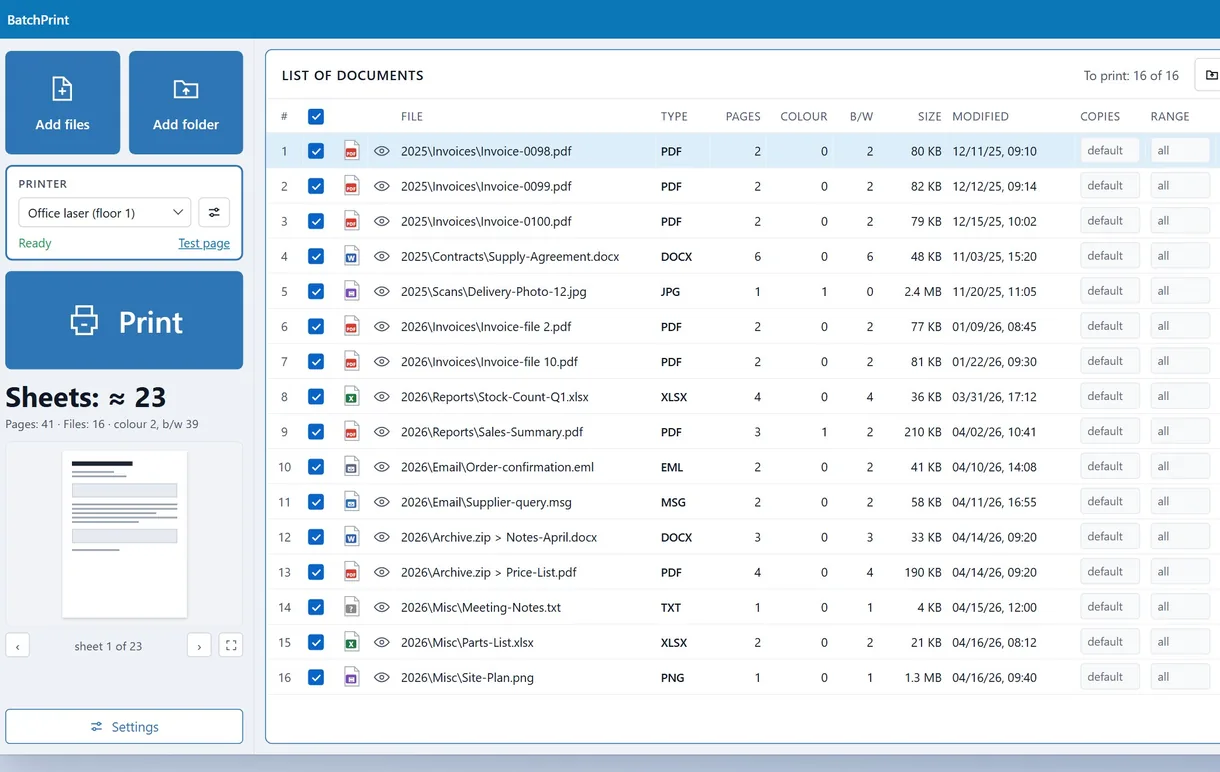
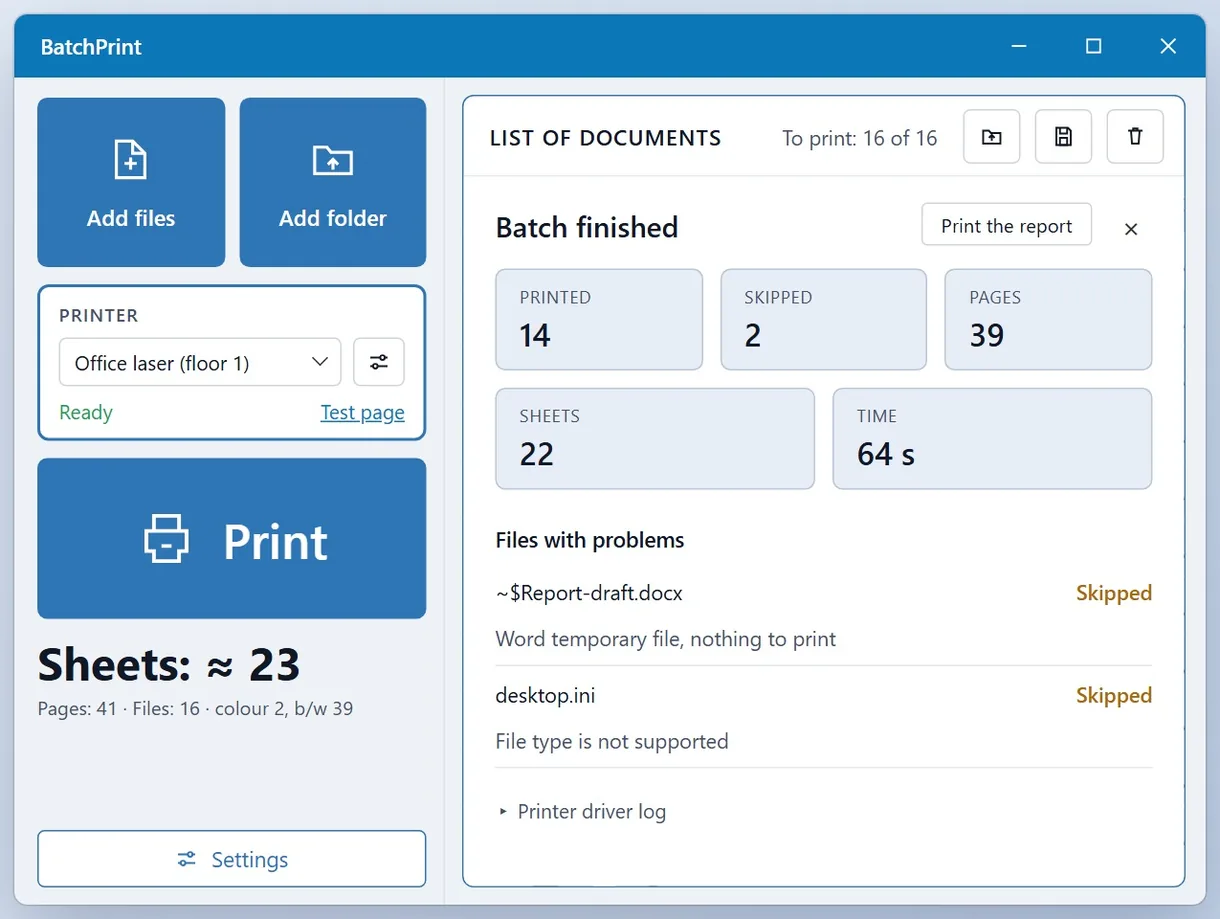
Batch Print Software gives you a Windows print queue. Add files, folders or ZIP archives and set copies and duplex for the batch. You do not have to open individual documents. Saved Outlook messages in .MSG and .EML print without Outlook, with attachments added as separate rows. We built it around an office worker receiving 30 PDF attachments in one email.
You can override copies, page range, paper tray, duplex, scale and color for each file. N-up fits up to 9 pages on a sheet and starts each new document on a fresh sheet. The footer's sheet counter shows the paper needed. To spread one picture across several sheets, print a poster on multiple pages.
Damaged or password-protected files are skipped while the rest keep printing. Files stay on your PC, and the program does not fetch remote images inside documents.
Pros:
- Prints office documents, emails and photos in one queue
- Renders PDFs without an installed PDF reader
- Prints Outlook messages and attachments without Outlook
- Supports print settings for each file
- Gives a print report that lists every file as printed or skipped, with the reason
Cons:
- Has no published user reviews on G2 or Capterra yet
- Has a shorter track record than Print Conductor
We rank it first for mixed documents and saved emails, with a report for each file. The free trial lets you check the results on your printer.
2. Total PDF Printer Pro - best for PDF-heavy offices that also print Word and Excel
CoolUtils sells two editions. Pro adds Word, Excel and images, including TIFF, to the base edition's PDF printing. The vendor listed Pro at $119.00 with a 30-day trial. Both editions run from a window or the command line, so you can script a nightly job.
Pros:
- Prints Office documents and images alongside PDFs
- Gives you 30 days to try it
- Runs from the command line or a window
Cons:
- Costs more than twice the PDF-only edition
- Has different starting prices on different vendor pages
- Displays a vendor-supplied rating of 4.7 out of 5
Choose Pro if you mostly print PDFs with occasional Office files. Check which edition a quoted price covers before buying.
3. BulkPrinter - best free starting point for mixed documents
BulkPrinter comes from PDFZilla. Its Print by Default Program mode sends each file to the application Windows uses for that type. The license reads Free + PRO. A 2022 review on I Have A PC described it as a free Windows program for printing different documents in bulk.
Pros:
- Offers a free edition
- Mixes PDFs and PowerPoint decks with other Office files and images
- Lists PRO at a promotional $49.95
Cons:
- Leaves the free edition's limits unstated on the vendor page
- Requires installed default programs in its main mode
- Has no buyer reviews on Product Hunt so far
For simple stacks on a zero budget, try BulkPrinter first. Test a real folder before relying on the free edition.
4. Total PDF Printer - best budget pick for PDF-only stacks
Pros:
- Costs $49.90 once for a lifetime license
- Offers a 30-day trial with no registration
- Runs from the command line for scripted jobs
Cons:
- Prints PDF files only
- Requires the $119.00 Pro edition for Word and Excel
- Fits poorly if you print saved emails or photos
This is the cheapest paid option on the list for batch printing PDFs.
5. 2Printer - best for command-line and scheduled printing
fCoder, which makes Print Conductor, pitches 2Printer to people who prefer a command line. You can use any command interpreter, including Command Prompt or Windows PowerShell.
Pros:
- Runs from Command Prompt or PowerShell
- Prints on a schedule without someone at the desk
- Offers a free version for home and other non-commercial use
- Shares its maker with Print Conductor
Cons:
- Requires you to write and maintain commands
- Suits admins more than staff selecting files by hand
- Had no commercial price in our research; check the vendor site
Choose 2Printer for an automated job, such as a script printing at 2 a.m.
6. FolderMill - best for hot folders on a shared PC or server
FolderMill, also from fCoder, prints or converts files dropped into a hot folder according to its rules. Several people can send work to one printer by saving files there. The free version adds a "Created by free version of FolderMill" watermark.
Pros:
- Prints or converts files arriving in a watched folder
- Lets several users share one folder
- Charges once, with no yearly fee
Cons:
- Costs $499, steep for one person's desk
- Watermarks output from the free version
- Uses folder rules instead of a hand-picked queue
At more than three Print Conductor seats, FolderMill pays off only when files arrive throughout the day from many people.
Is Print Conductor free?
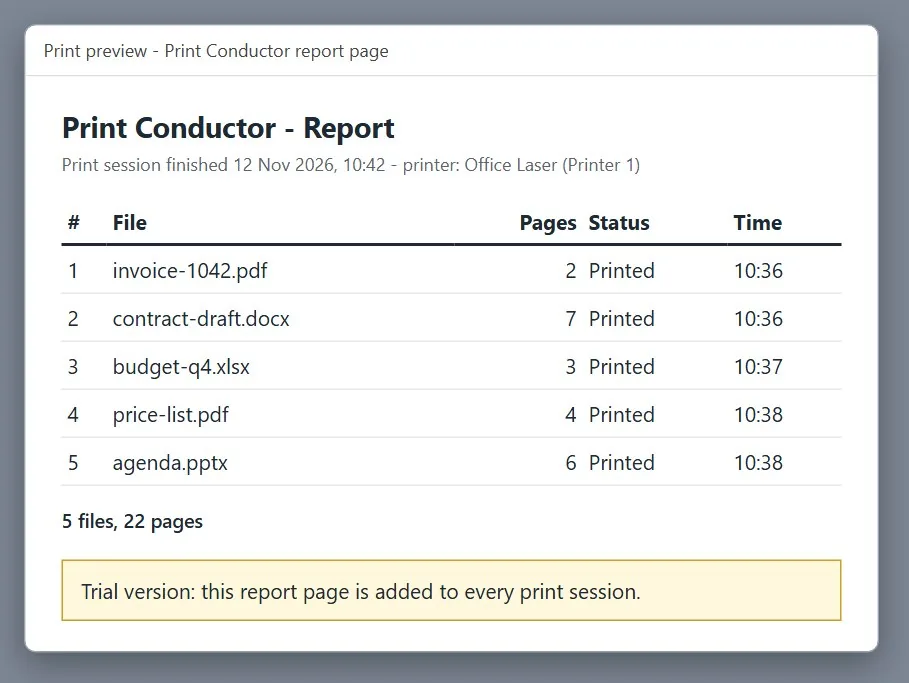
Print Conductor is paid software with a free trial. The trial includes all commercial features and adds a report page after each print session.
The vendor's download page describes the trial as free of charge for testing and evaluation. The setup file is about 202 MB; no registration is needed. Regular work requires a license, which removes the report page.
Older download catalogs list Print Conductor as free software, or free for non-commercial use with nag screens. Those listings describe an earlier licensing model. The current page has no personal-use free tier, so check the listing date before counting on a free copy.
Print Conductor price: how much does one license cost?
Two independent reviews put one commercial seat at about $149, paid once. Volume orders cost less per user; Enterprise billing is yearly.
iTechGuides listed the commercial license at $149 as a one-time purchase with no additional fees, in a review checked in September 2026. On November 12, 2026, the vendor's order page listed $99, $79 and $59 per user for orders of 5, 20 and 50 seats or more. Enterprise started at $2,450 per organization, billed yearly.
Aggregators sometimes show the Enterprise figure as the starting price, making a single seat look far more expensive. Read the license type beside the price.
Over three years, you pay for a one-time license once and the Enterprise plan three times.
Do you need Office installed to batch print Word and Excel files?
Most batch printers here send Word and Excel files to Microsoft Office. Ours uses Office, then LibreOffice if needed. With neither installed, its built-in reader still lays out DOCX and XLSX pages, no installed Office required, though without document headers and footers.
DownloadCrew's review of Print Conductor says the parent applications must be installed. Print Conductor's website says its default settings print Word files through the Microsoft Word API.
Office-dependent batch printers
- Word and Excel files go to Microsoft Office
- A PC without Office needs it installed first
Our print queue
- Uses Office first, then LibreOffice
- Lays out DOCX and XLSX pages itself when neither is there, without headers and footers
Our PDF printing needs no Adobe Reader and does not depend on your default PDF program.
Most programs say little about saved email support. For Word-only stacks, you can also batch print Word documents with programs already on your PC.
Do you need a print queue or an automated tool?
Use a queue to pick files yourself, a hot folder for files arriving from many people all day, or a command line for jobs an admin sets up once.
Print Conductor and our program offer queues. So do BulkPrinter and both Total PDF Printer editions. You can check every file and its settings before printing.
With FolderMill, you save files into a folder without opening a program. Its rules handle printing. This suits a reception desk or shared scanner station receiving documents all day.
2Printer and both Total PDF Printer editions accept commands for scheduled jobs. Print Conductor can also start from the command line with saved settings.
Choosing the wrong workflow is a frequent buying mistake. A $499 hot-folder server will not speed up your weekly invoice run. Files arriving at night while nobody is logged in never reach a queue.
Which tool fits your print job?
Choose from the five print jobs below.
The office worker with mixed stacks. For PDF invoices, Word contracts and saved emails with attachments, choose Batch Print Software.
The PDF-only desk. Choose Total PDF Printer; move to Pro if Word or Excel files start arriving.
The home user on no budget. Use File Explorer for a small selection of one file type. Try BulkPrinter's free edition for larger or mixed batches.
The admin with a schedule. Choose 2Printer, or Total PDF Printer for PDF-only jobs.
The team sharing one printer. Choose FolderMill for steady daily volume.
Download for Windows Buy license
Print Conductor free alternative: is there one?
For small stacks, select files in Windows File Explorer, right-click and choose Print. File Explorer is the Print Conductor free alternative built into Windows, but it fails with mixed file types and large selections.
Above that number, Print disappears from the menu. PCWorld explains that Print also disappears when you select different file types, even if each type prints separately. Windows 11 users report that Quick Print no longer appears and that dragging PDFs onto the printer queue produces a "This file cannot be printed" message.
File Explorer's PDF printing also depends on your default PDF reader. In one case, two identical office PCs printed the same PDFs, but one opened every file maximized before sending it to the printer.
None of the three free editions above is open source. For PDFs, printing a stack of PDFs on Windows 11 and Mac gives the built-in steps.
Also considered
- Batch & Print Pro is a paid Windows program with hot folders and a scheduler. We could not open its vendor page or confirm a price
- SilentPrint is a paid Windows program for batch printing and PDF conversion, with too little public detail to judge
- AcroTeX PDF Print Monitor is free but prints only PDFs from one monitored folder, covering little of Print Conductor's job
Comparison sites also list print management suites. We excluded them because they manage company-wide printers and print quotas.
Sources
- SoftwareReview: Print Conductor - starting price of $149.00 for a commercial license
FAQ
Is Print Conductor free?
Only the trial. Regular use requires a license.
Can I print a PDF without Adobe?
Yes. File Explorer uses your default PDF program; ours renders PDFs itself.
What is the best free printer app?
Use File Explorer for small selections of one type, BulkPrinter for mixed stacks, or 2Printer for non-commercial command-line printing.
How do I print 30 PDF attachments from one email?
Save the message as .MSG or .EML and add it to an email-capable batch printing queue. Ours queues the attachments separately and prints all 30 PDFs in one run.
Can these alternatives batch print on Windows 11 and Windows 10?
All six are Windows desktop programs. Ours supports 64-bit Windows 10 and 11. Check the other vendors' pages for supported versions.
What is 2Printer?
fCoder's batch printing program for a console window and scheduled jobs.
Can I batch print online?
None of these programs runs in a browser. Printing uses your PC's printer drivers, so you need a desktop program or File Explorer.
Why does Windows hide Print when I select many files?
File Explorer limits Print to small selections of one file type. Use a batch printing program for larger or mixed selections.
Got a whole stack waiting? Drop the folder into one queue and press Start.